Submission of the Application for a place in the Dormitory takes place via the USOSweb system:
https://usos.p.lodz.pl
Applications for a spot in the dormitory may only be submitted by students who have been admitted to the university and have received the necessary access from the university to use the USOSweb system (the “For Everyone” tab, “Applications” module). Information in this matter will be posted on the recruitment portal.
However, this does not exempt you from the obligation to familiarize yourself in advance with the rules for applying for a spot in the dormitory (as described in the Regulations on Student Benefits, available at: https://p.lodz.pl/en/students/support-students/scholarships/ordinance-no-482025-rector-lodz-university-technology-2-december-2025-establishing-regulations-benefits and the instructions for completing the application form below). The application schedule (accommodation schedule) can be found at: https://p.lodz.pl/en/students/support-students/accommodation
When examining applications, the following criteria are taken into account:
- The primary criterion for granting accommodation in a student dormitory (DS) is the distance between the Student's permanent place of residence and Lodz University of Technology.
- The following shall have priority in the right of residence, regardless of the place of permanent residence: mothers and fathers raising children and pregnant students, as well as people in particularly difficult life situations.
After logging in to the USOSweb system, select the “COMMON SECTION --> Applications”) tab.
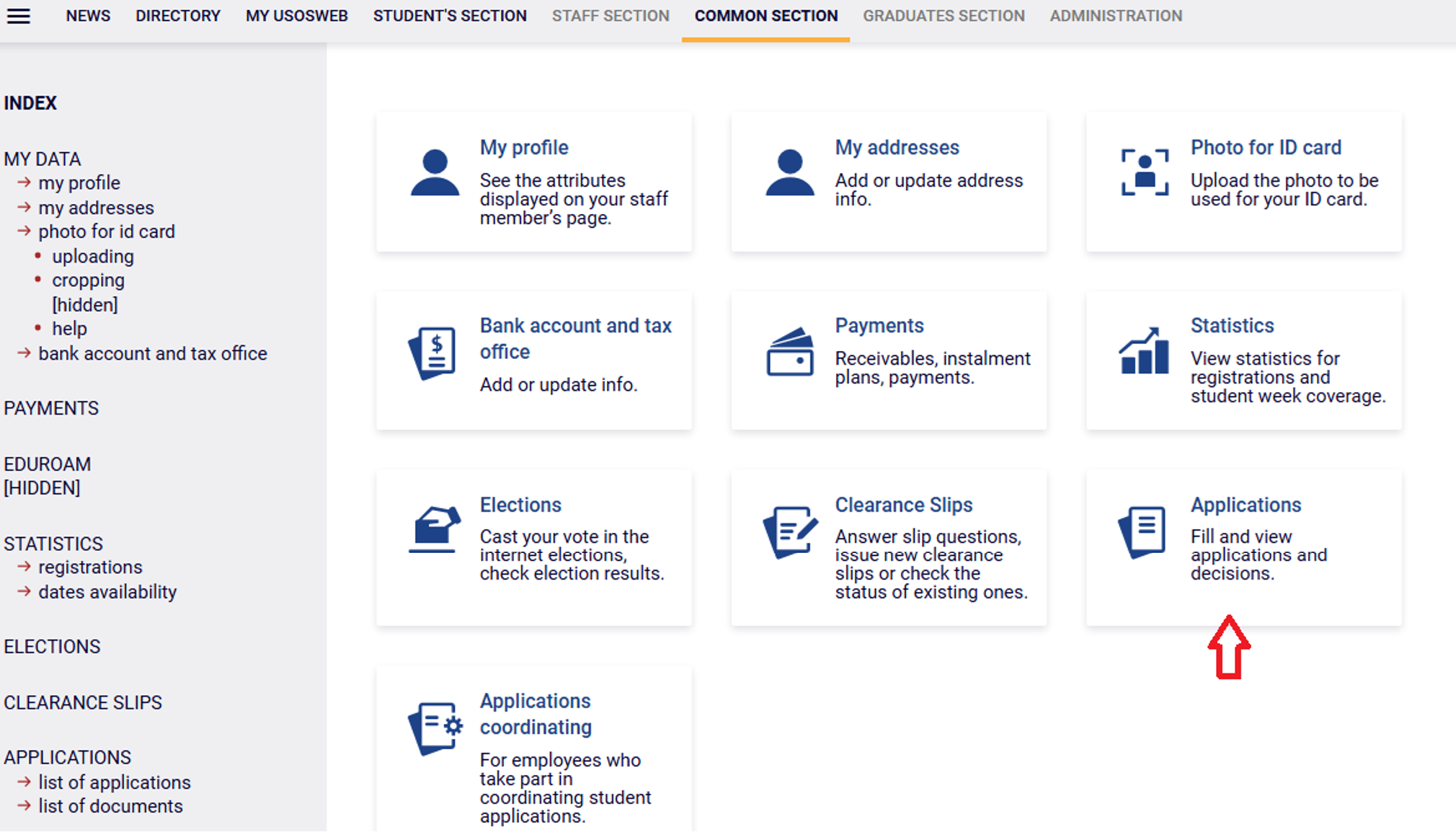
If you want to start filling in, find the application called Housing application and then click the link fill in.
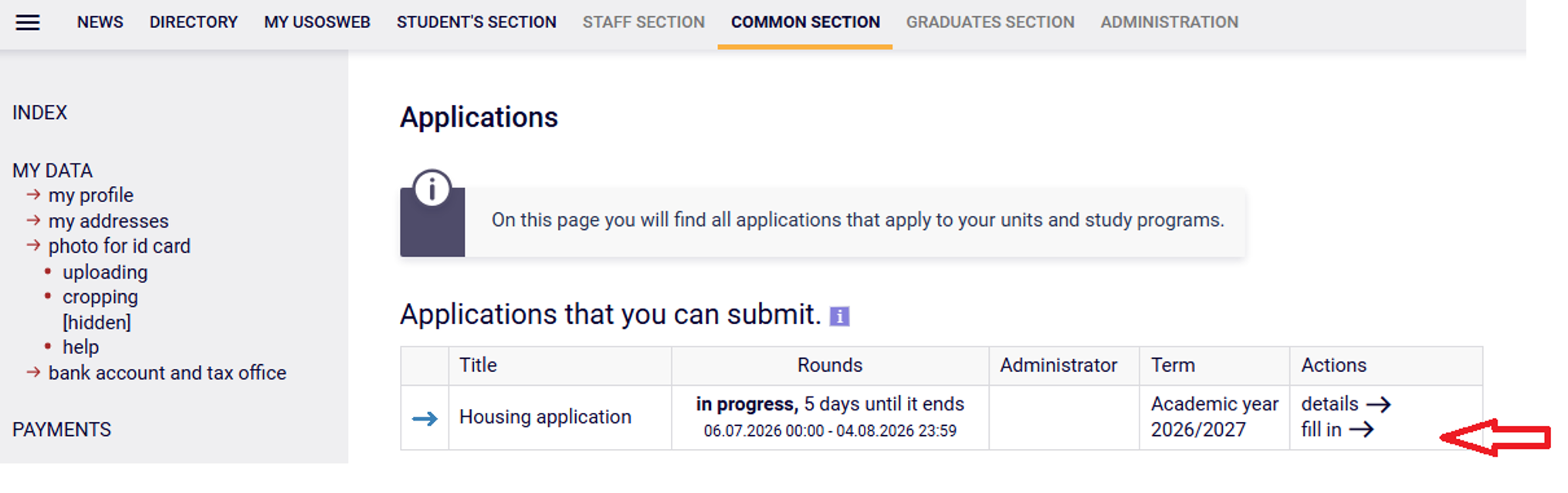
The list of applications that can be submitted in your departments is in the form of a table, the rows of which represent the individual types of applications that can be submitted.
The table consists of the following columns:
- Graphical symbol representing the status of the application in relation to the student:
- prohibition sign – inability to complete the application,
- arrow – application that can be filled in.When you hover the cursor over the symbol, additional information about the status of the application will be displayed. - Title - defines the type of application - in our case Wniosek o akademik (Application for a dormitory).
- Rounds - represent time slots during which applications can be submitted.For each turn displayed in this column, the following is given:
- status (in progress, closed, will start in...),
- time interval (opening time and closing time of periods). - Administrator (organizer) - the university responsible for the subject of the application.
- Term (cycle) - the so-called didactic cycle within which inference takes place, in our case it is a specific academic year.
- Actions - here are links enabling the student to carry out selected activities:
- details – detailed information about the application
- fill in – start filling in the application
If you have already started filling in the application and you want to continue or you have received information that your application has been withdrawn for improvement, search for it in the tab COMMON SECTION --> Applications and click the link to continue the application.
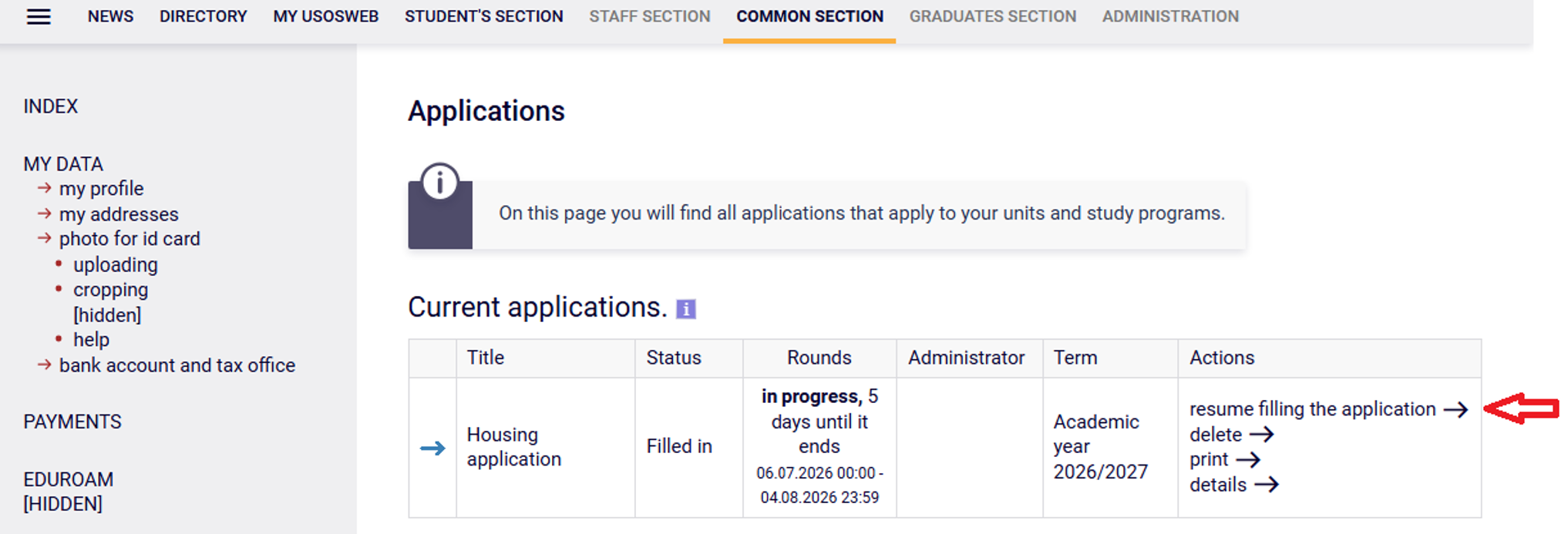
The list of applications that you have started to complete includes both applications submitted by the student and applications that are in the process of being completed (i.e. those that have been discontinued before submission). The list is in the form of a table, the rows of which represent the individual conclusions of the student.
The table consists of the following columns:
- Graphical symbol representing the status of the application from the Stan (Status) column:
- arrow - filled, corrected,
- square - registered, processed,
- tick mark - ready for consideration,
- cross - withdrawn to be corrected, withdrawn to be supplemented, left unrecognized. - Title - defines the type of application.
- Status - the application is at any time in the so-called state, which determines what is happening with the application at a given moment or what actions should be taken by the student regarding the application.The most common states of applications:
- Filled in – the student began to fill in the application, but has not yet submitted it,
- Registered - the application has been submitted electronically and is waiting for a signed paper version to be submitted to the authority examining the applications,
- Delivered - the application was formally submitted in a paper version and is awaiting verification of correctness by the authority examining the applications,
- Declared incorrect - it was found that incorrect data were provided, the student has the right to re-edit the application in order to make corrections,
- Being corrected - the student began to correct the application withdrawn for improvement, but has not yet submitted it again,
- Declared incomplete - it was found that one or more attachments to the application are missing, the student must provide relevant documents,
- Left unexamined - the application was not allowed to be examined due to formal errors or deficiencies,
- Awaiting consideration - the application has been considered formally correct (this does not mean that the application has been positively considered yet, but only that it is complete and does not contain errors),
- Verified - a decision was made regarding the student's application. - Rounds - represent time slots during which applications can be submitted.
- Administrator (organizator) - an administrative unit of the university, which is responsible for the subject of the application and the application itself.
- Term (cycle) - the so-called didactic cycle within which inference takes place. A didactic cycle may be, for example, a specific academic year or semester.
- Actions- links enabling the student to carry out specific activities in relation to a given application.
The most common activities are:
- Print - allows you to print the application when, for example, it is necessary to deliver it in paper form to the dean's office.
- Continue filling in (application in states filling, withdrawn for correction, corrected) - move on to further or re-filling the application. The system remembers on which screen the filling has been completed and automatically sets itself on this screen.
- Delete (application in states being filling, withdrawn for correction, corrected) - deleting the application means resigning from filling and submitting it.
- Print declaration - some applications require the last formal step - print and submit the statement.
- Details - opening the Information about the completed application page, which displays the application details (application type, application status, data entered by the student, history of application status changes).
Each application shows a list of activities that you can perform at the moment, e.g. start filling in, delete, continue filling in, etc. This list depends on the rights you have at a certain stage of the application and on the status of the application.
Remember! Submission of the application takes place only electronically. You don't have to print the application. The University will not accept paper applications.
Subsequent Application Screens:
1. This screen indicates from which pool of places you want to apply for a place in the Student Dormitory. This option is set automatically.
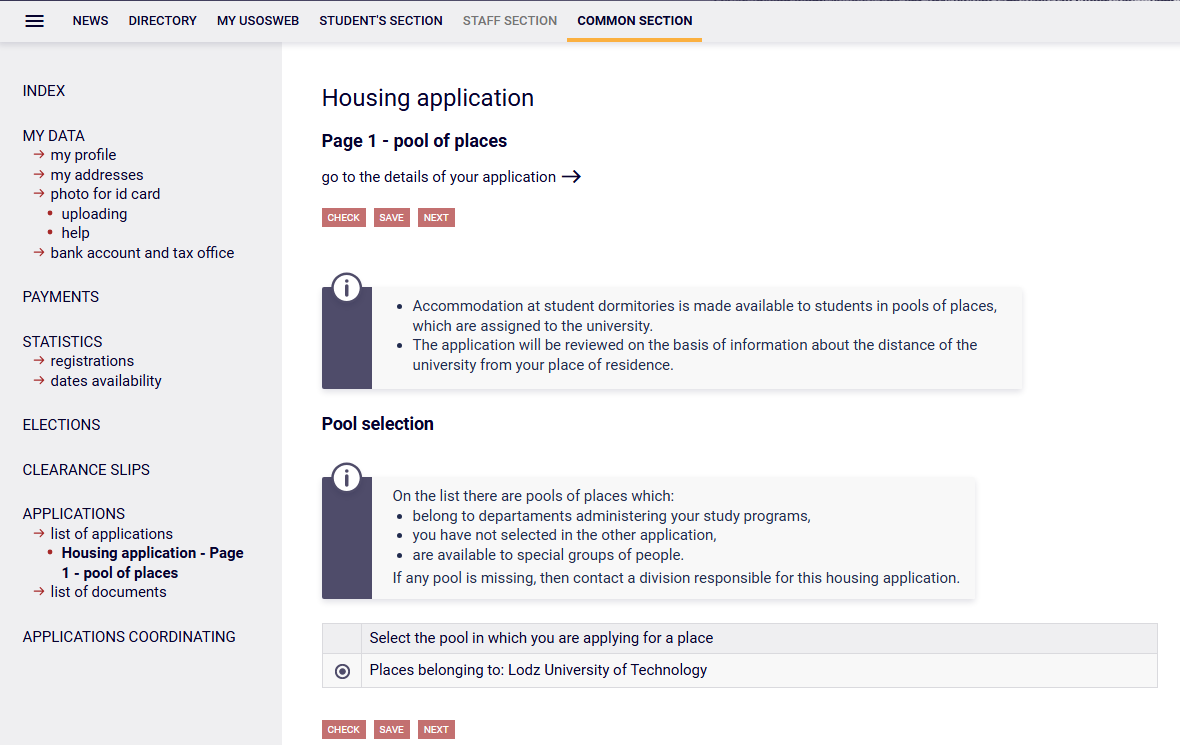
Filling in the application takes place by completing the information in the forms available on the pages displayed successively called screens. Each screen (except the last one) has a Next button at the bottom, allowing you to move to the next screen. Similarly, on each screen there is a Back button, thanks to which you can go back to the previous screen and correct the entered data (on the first screen this button is inactive). Filling in the application begins with the screen with number 1, followed by screens marked with consecutive numbers (2, 3, etc.). Depending on the data entered by the student, some screens may be omitted.
Each screen contains a number of additional information, explaining exactly what to enter in each of the forms.
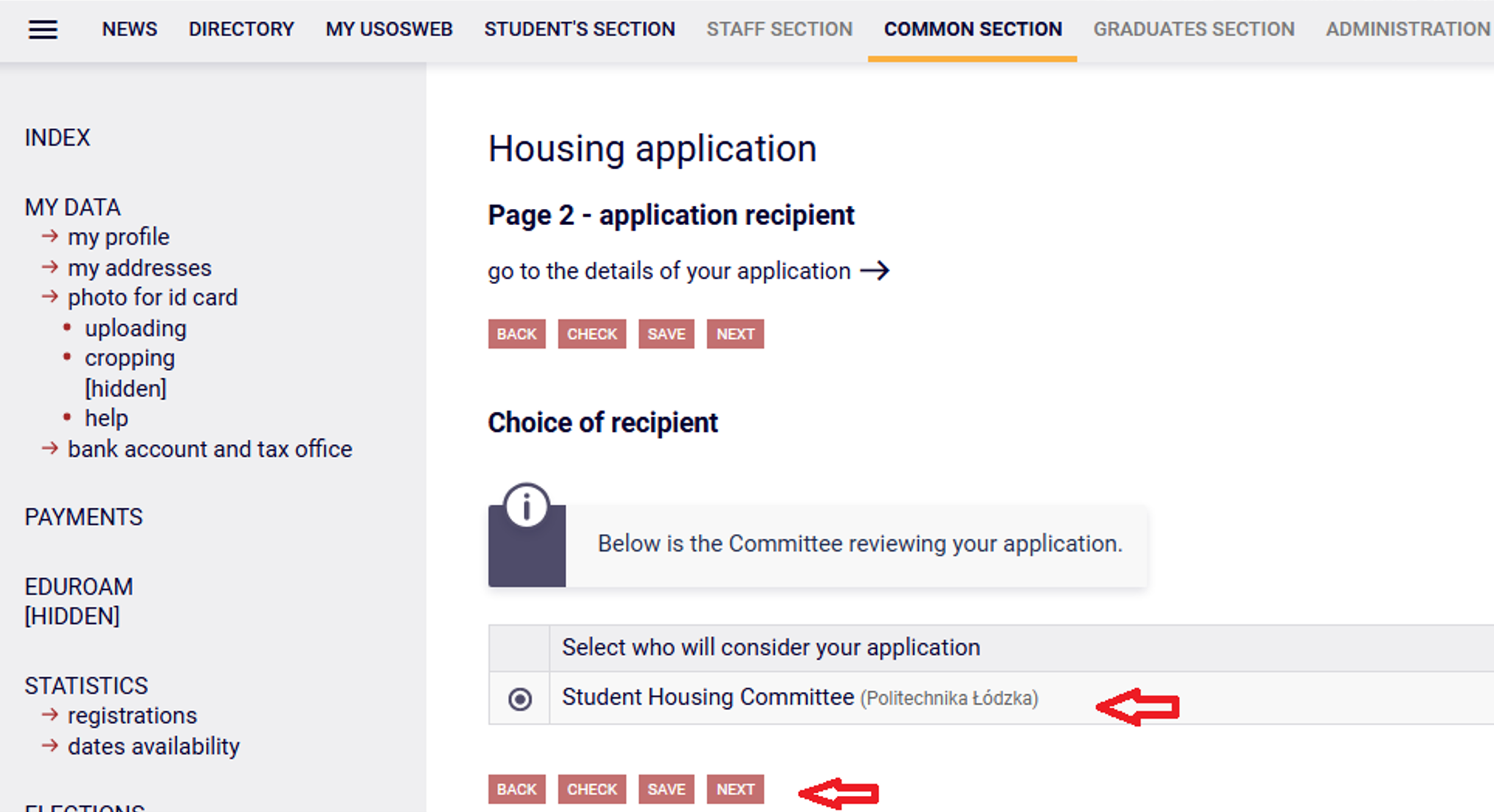
2. This screen will indicate the committee to which your application for a place in the Dormitory will be submitted - it is the Student Accommodation Committee. This option is set automatically.
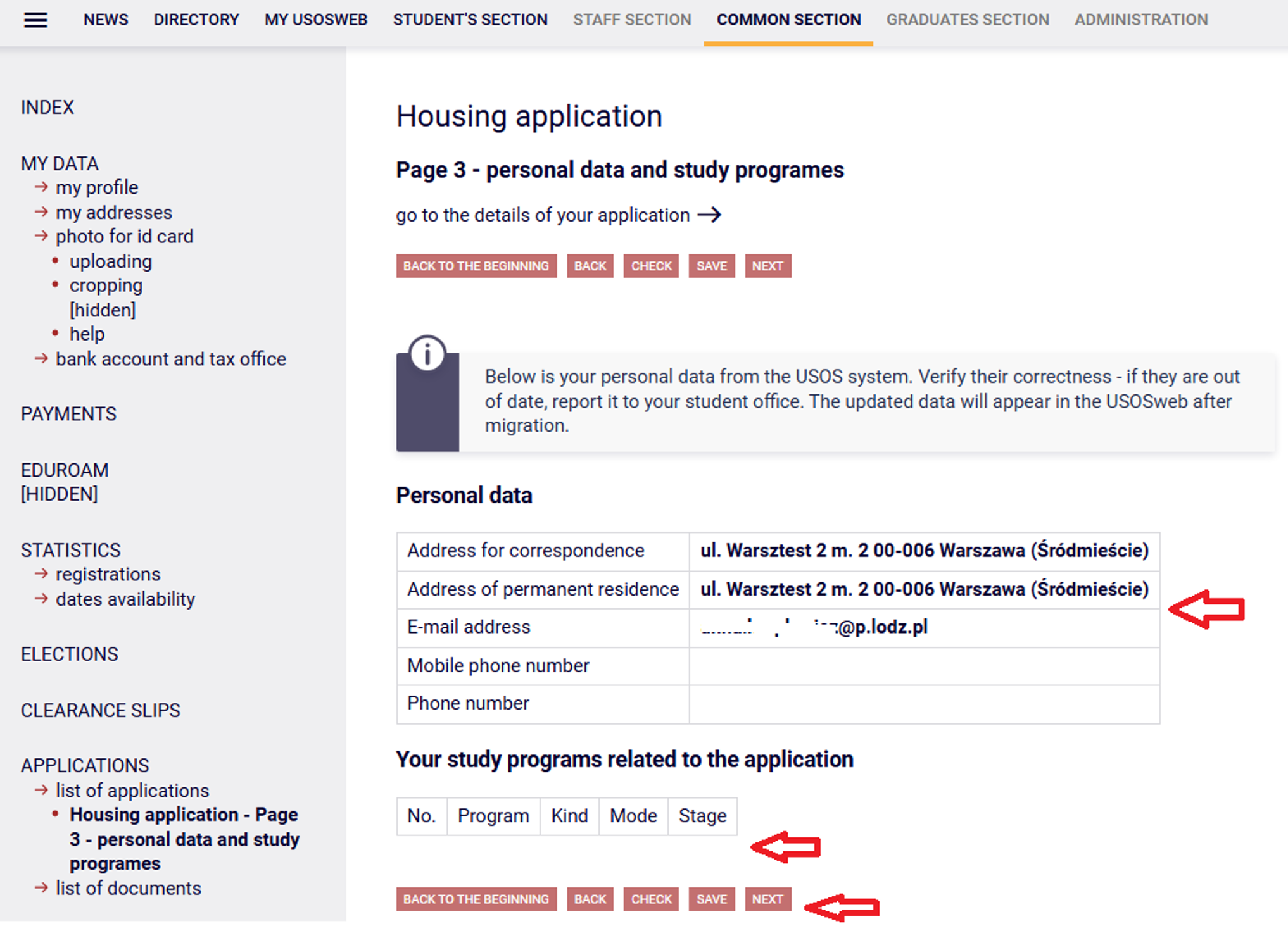
3. Verify your personal information on this screen. In the event of a discrepancy, you can update the data in the Dean's Office/Office of your faculty. The changes made will be visible in the USOSweb after the data migration, i.e. the next morning.
4. On this screen, you indicate the period for which you want to get a spot in the Dormitory. Next, enter the distance between the university and your place of residence (select from the Google Maps search). You can also indicate (optional) special circumstances entitling you to receive additional points taken into account when allocating places in dormitories, including in a single room.
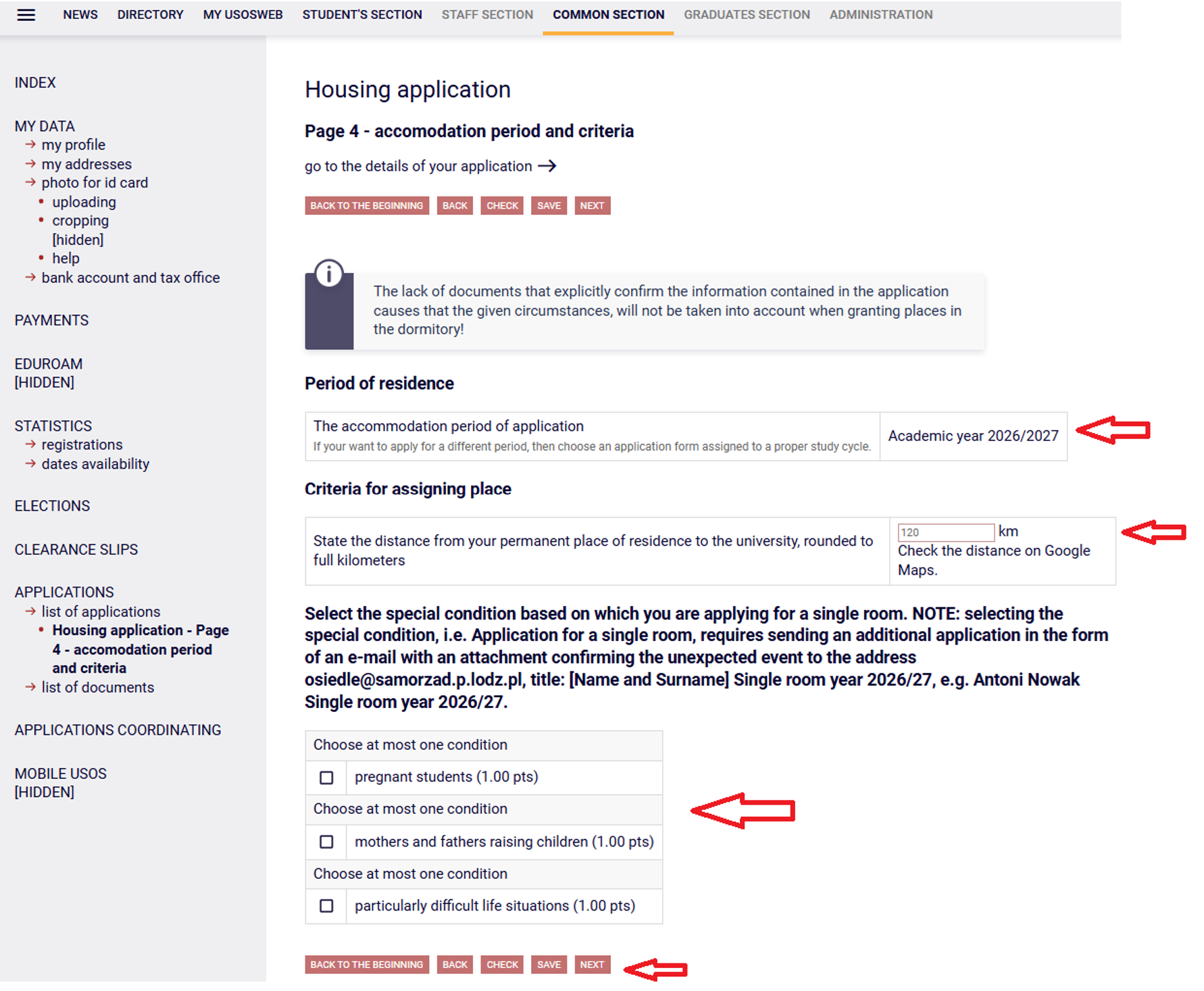
NOTE: ticking the special condition, i.e. Wniosek o pokój jednoosobowy (Application for a single room), requires an additional application to be sent in the form of an e-mail with an attachment confirming the random situation to the following address: osiedle@samorzad.p.lodz.pl, subject: [Name and surname] Jednoosobowy r.ak. 2026/27, e.g. Antoni Nowak Jednoosobowy r.ak. 2026/27.
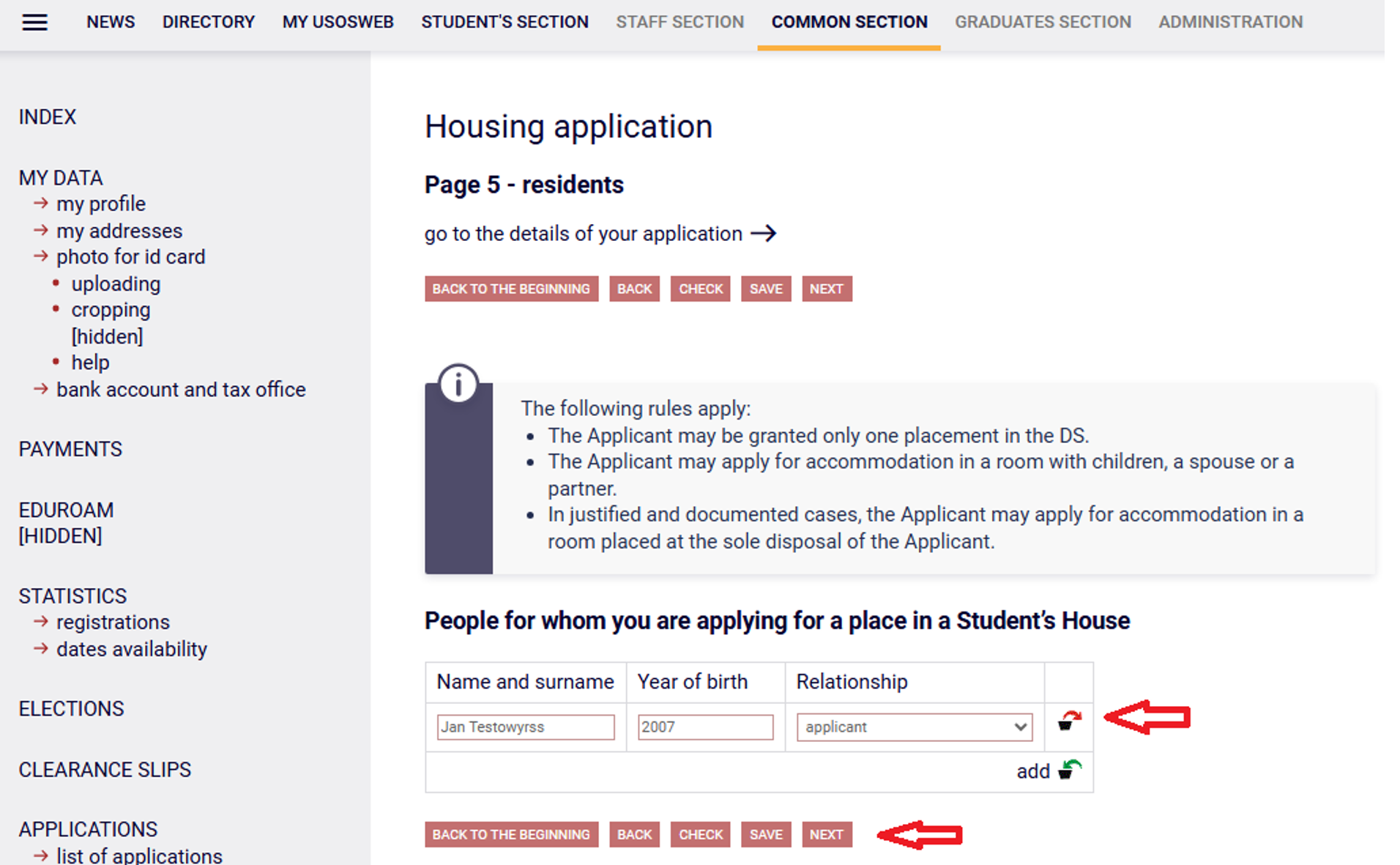
5. On this screen, enter information about the family members for whom you want to apply for a place in the Student Dormitory. You can apply for a place for a child or a spouse.
If you want to add your family members to the list for whom you want to apply for a place in the Dormitory, click the Dodaj (Add) link.
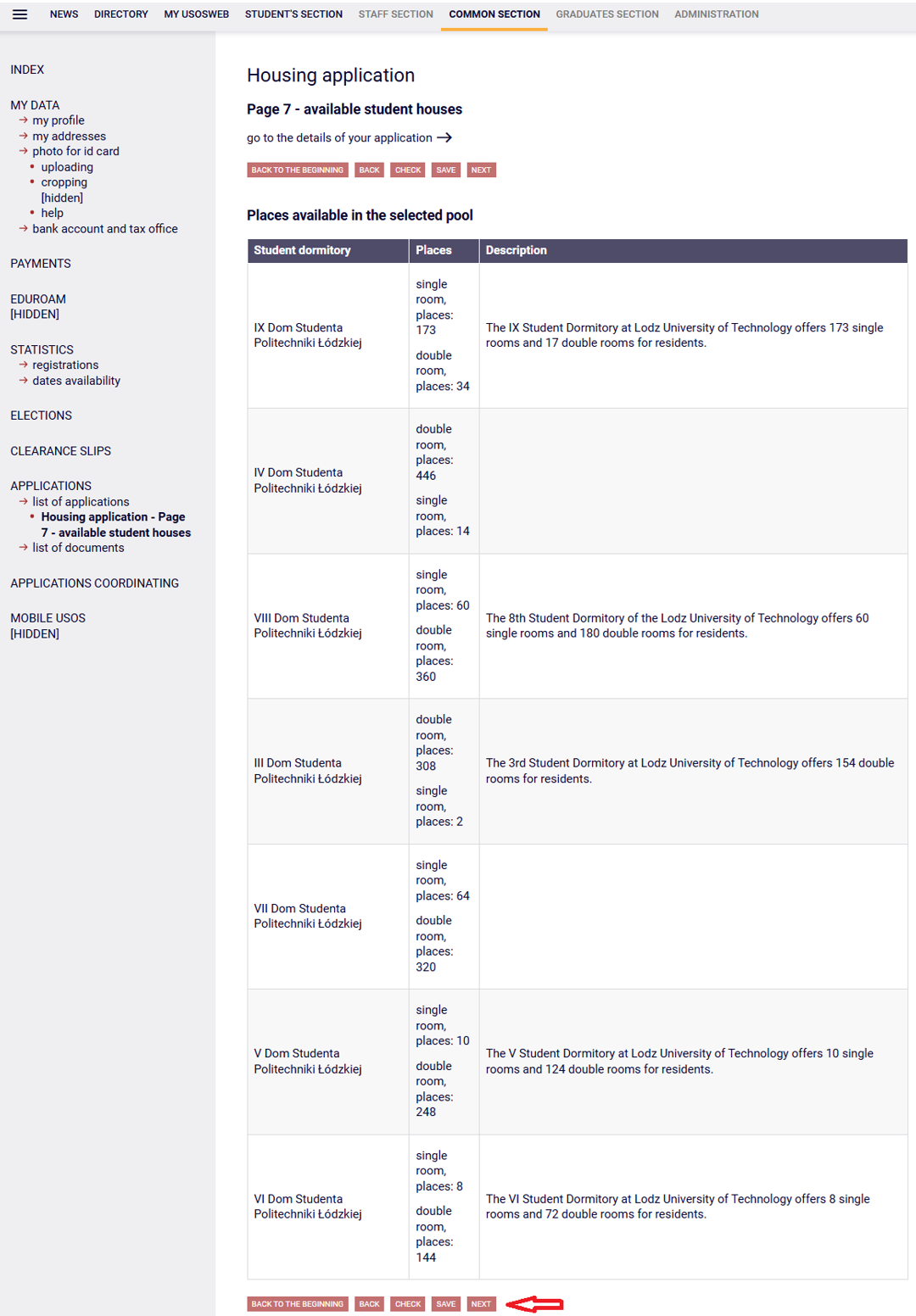
6. This is an information screen where you can browse the list of available places in individual Student Dormitories.
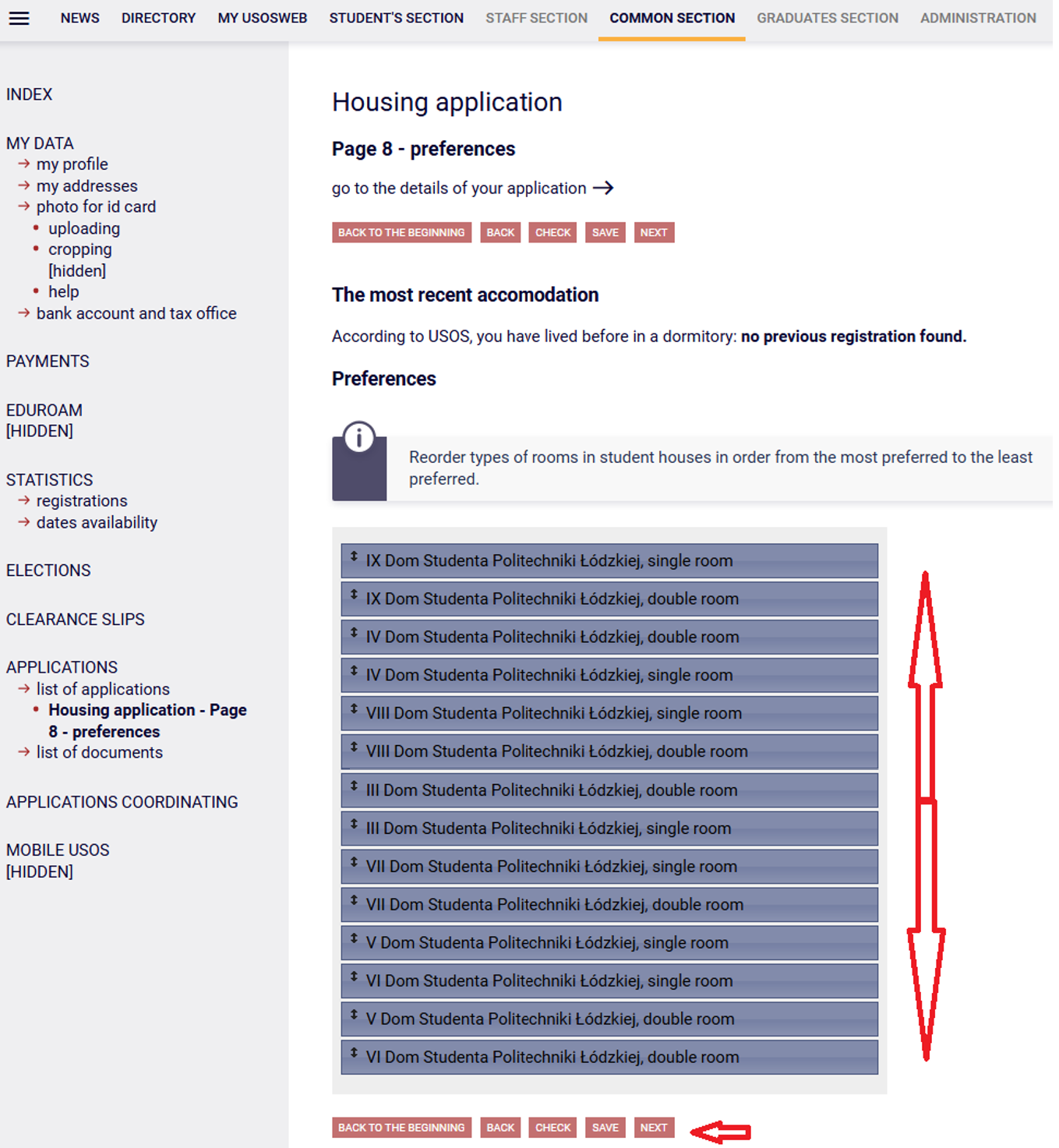
7. On this screen, by reordering the list, you indicate your preferences regarding the selection of Dormitories and rooms. In addition, information about the Dormitory where you last lived is visible here.
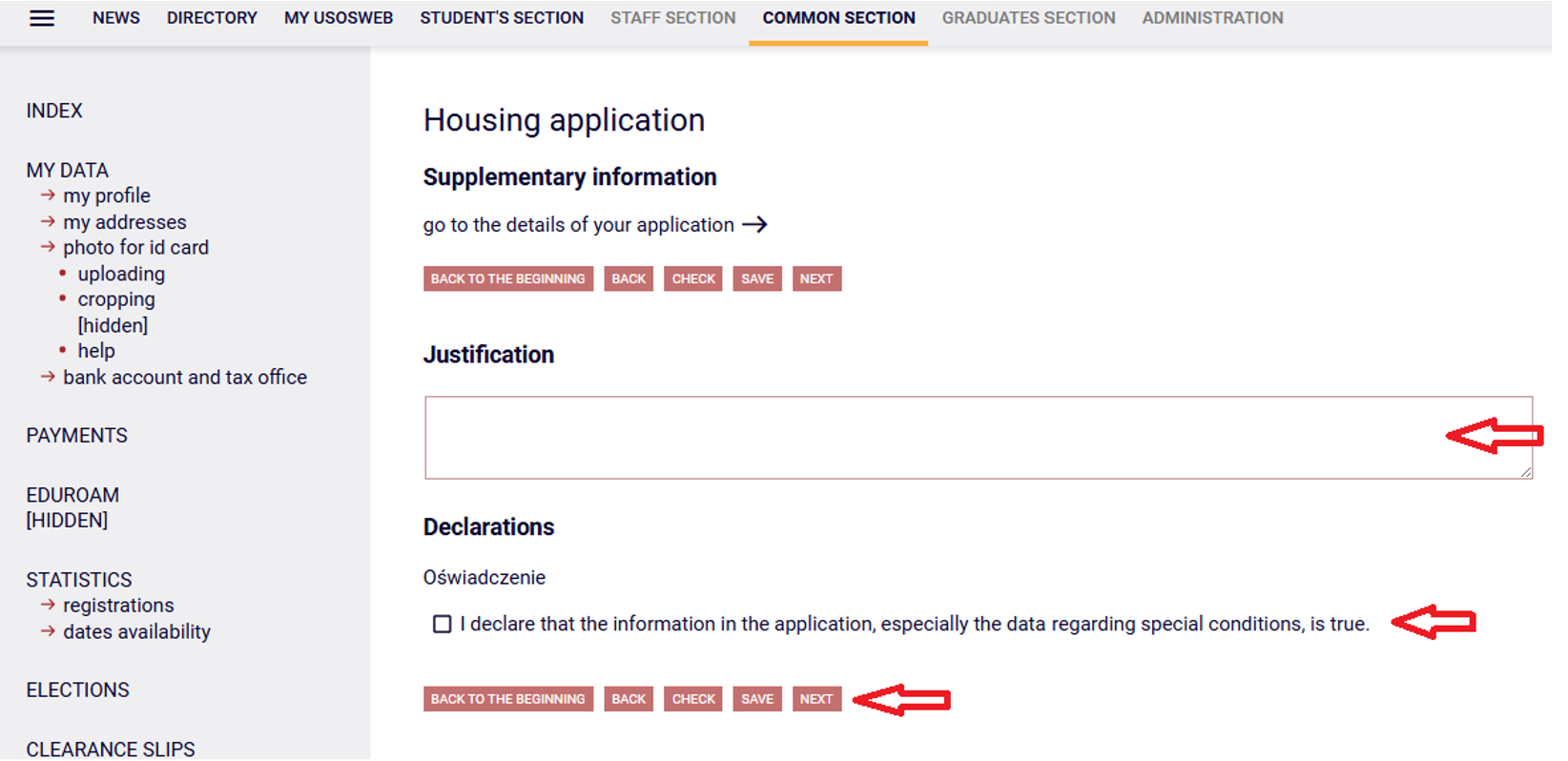
8. This screen provides space for additional justification and acceptance of the required statements.
9. The next screen is for submitting the application.
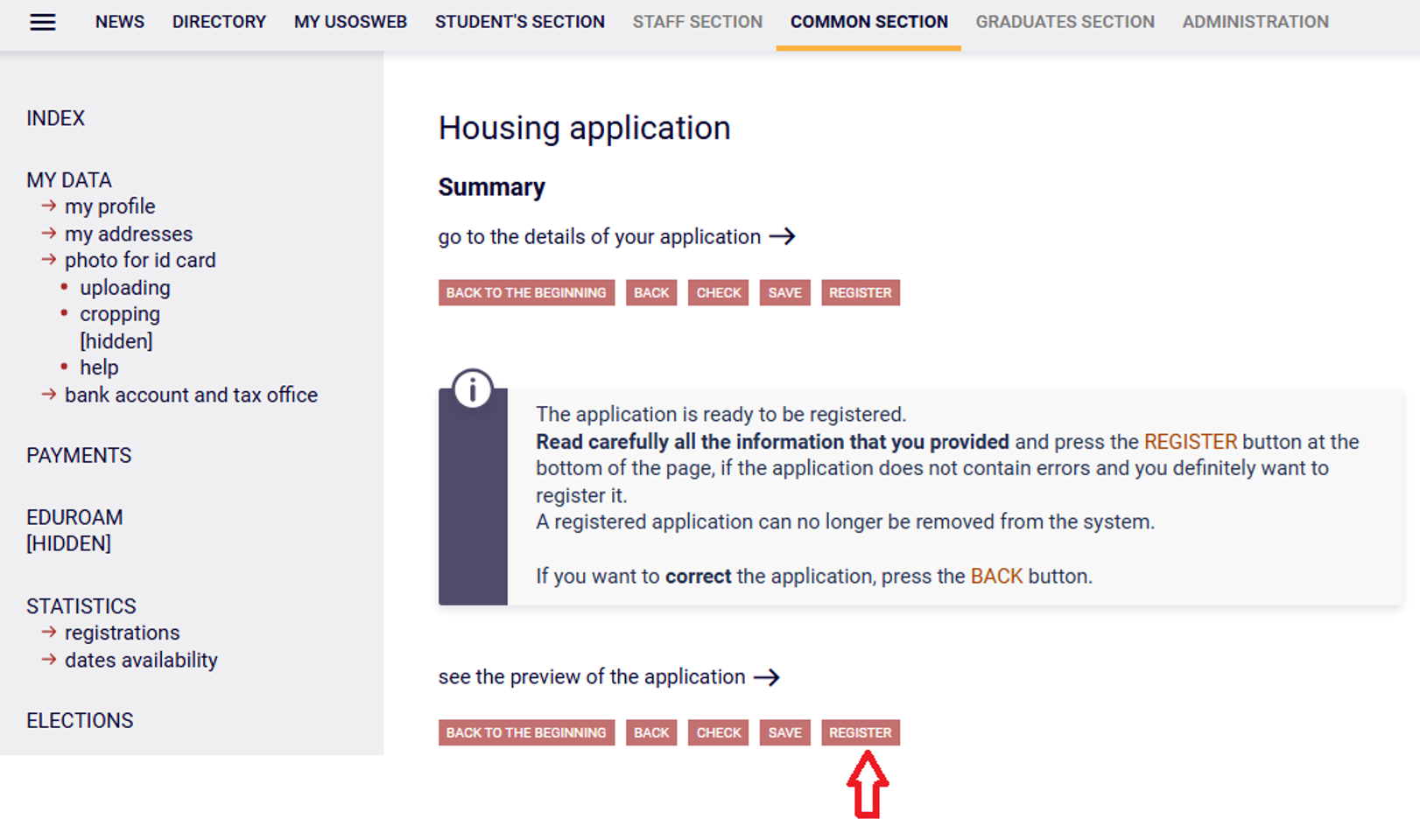
Once completed, the application must be REGISTERED. We do not use the option: Podpisz i złóż elektronicznie (Sign and submit electronically).
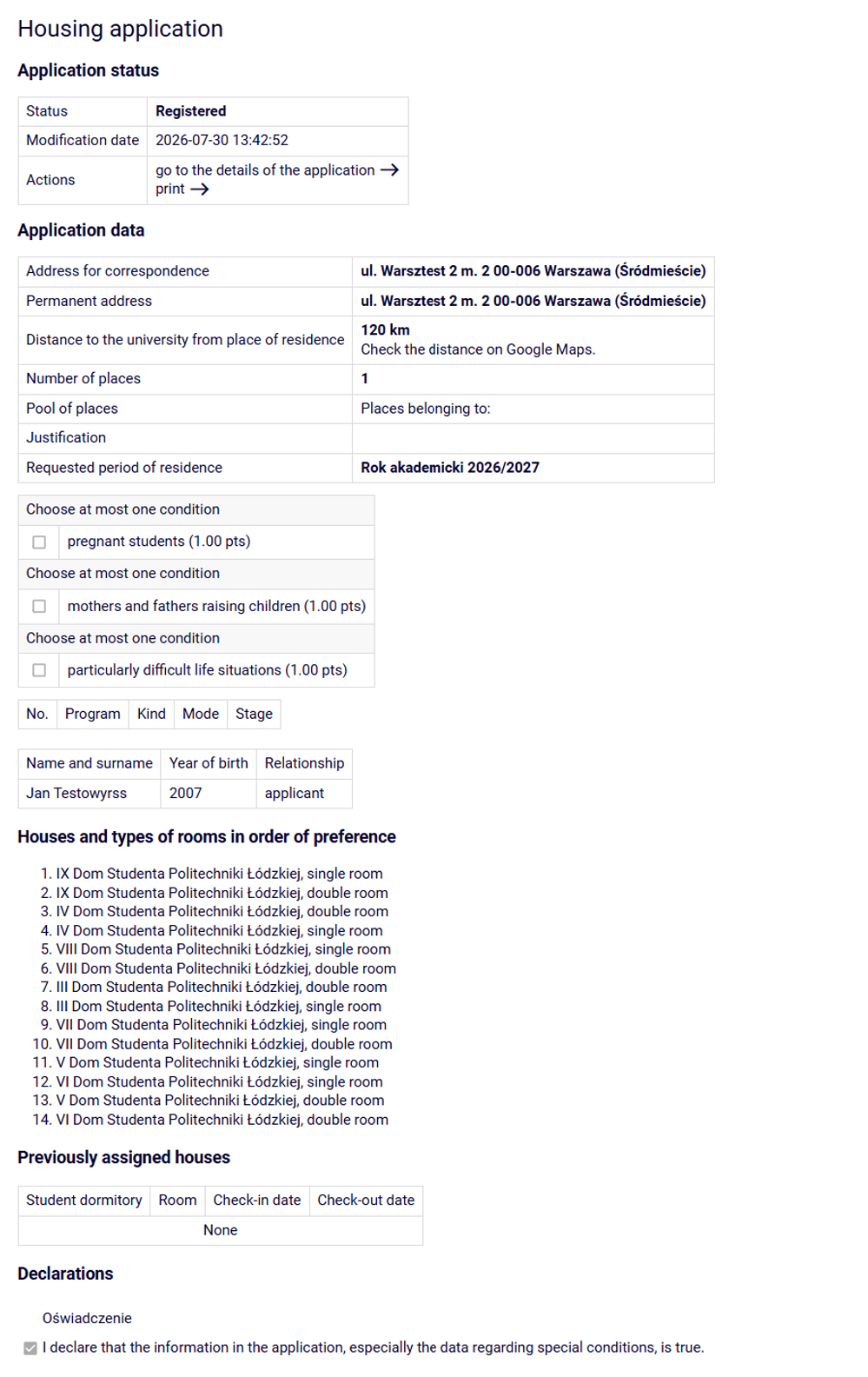
10. Appearance of the application after registration.
11. Once a spot has been assigned, the system will automatically notify you - within the timeframe specified in the schedule - via a note in the USOSweb system (under the COMMON SECTION --> Applications) tab. There are no other ways of informing, therefore the status of the application should be monitored.
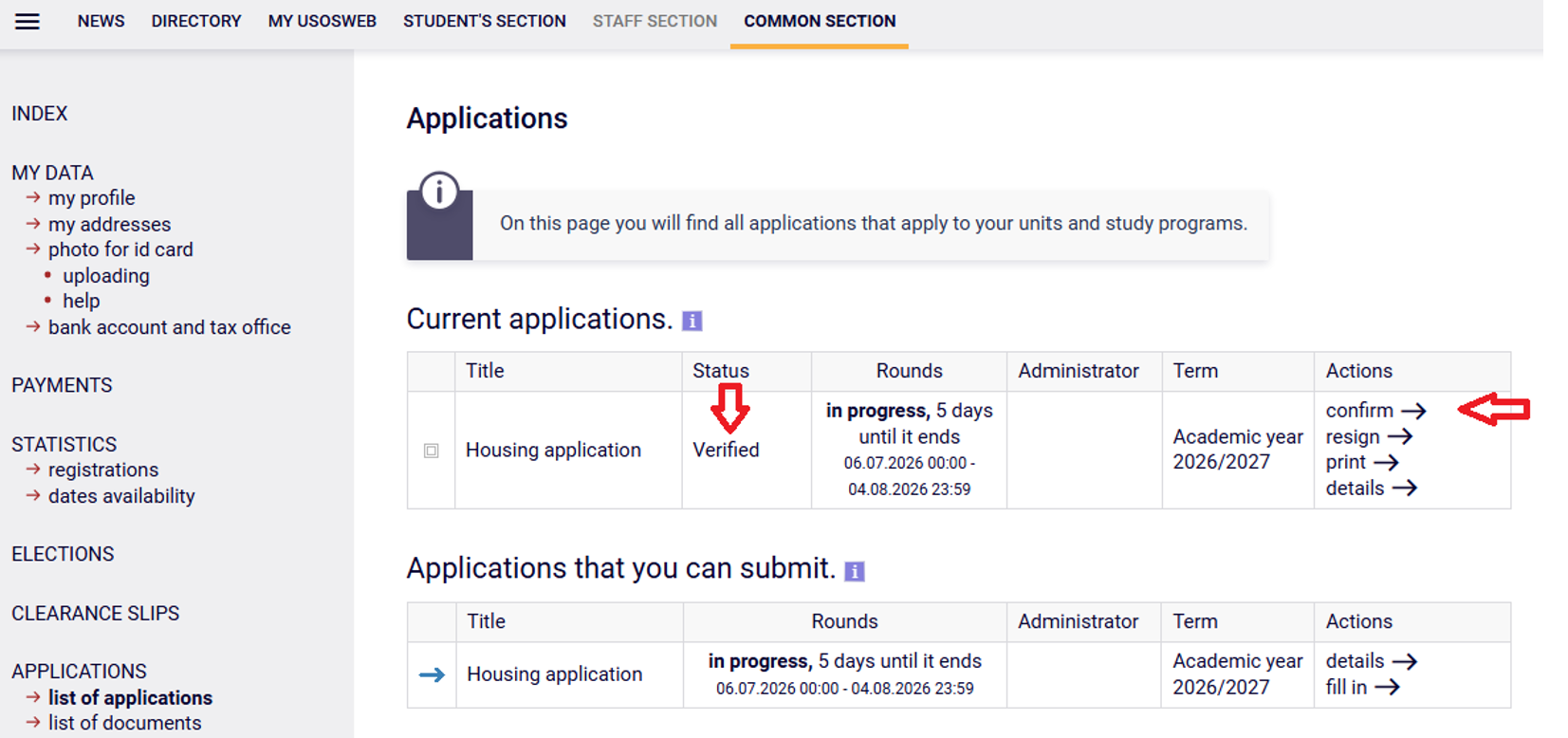
Regardless of the allocation of space in the system, the status of the electronic application should be regularly checked, because the system allocation of space is only the first stage of the decision-making phase of the procedure. Once a spot has been allocated, confirm or resign the allotment.
Once a place has been granted, please read the Message regarding accommodation at Student Dormitory for the academic year 2026/27 , which will be placed on the Lodz University of Technology website --> Students --> Support --> Accommodation.